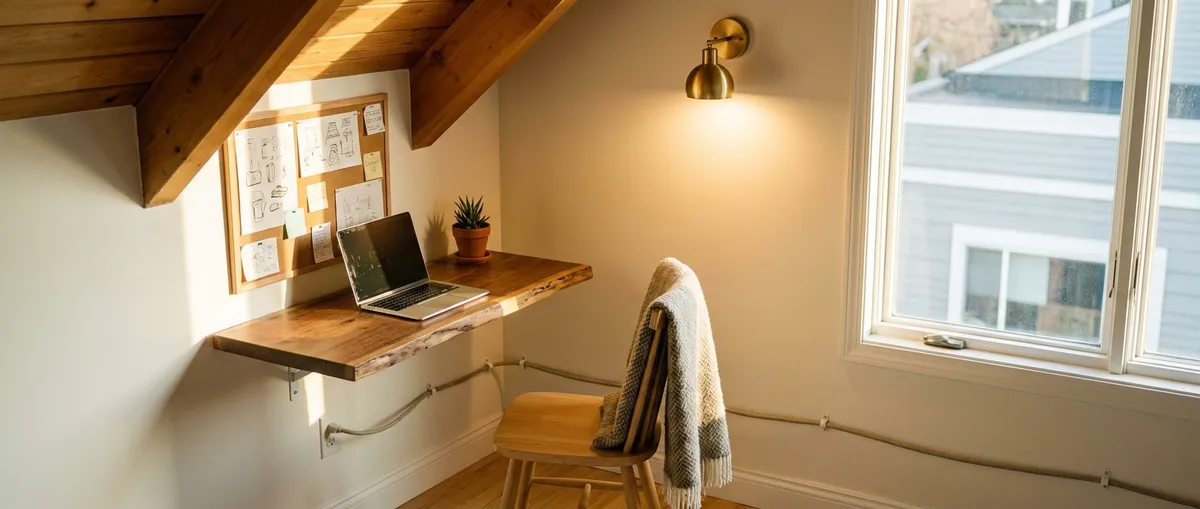
If you’ve been working from the couch or kitchen table, you already know it doesn’t really work. The good news: you don’t need a spare room or a full remodel to carve out a functional, good‑looking workspace. With a few focused DIY projects, you can turn an unused corner, alcove, or wall into a quiet, efficient home office nook that actually helps you get things done.
This guide walks through five practical, step‑by‑step mini projects that fit together into one complete corner office setup. You can do them over a couple of weekends, adjust to your space and budget, and end up with a workspace that feels intentional, not improvised.
Step 1: Choose the Right Corner and Plan Your Layout
Before you buy anything, pick the spot and plan the basics. A smart location will make every other step easier.
- Walk your space with a notebook. Look for underused areas: a bedroom corner, the dead zone by a window, a landing, or a wide hallway end. Aim for a minimum width of about 36"–48" for a comfortable desk area.
- Check for power and internet. Look for a nearby outlet and, if possible, a spot where your Wi‑Fi signal is strong. If outlets are limited, plan for a heavy‑duty power strip mounted under the desk.
- Measure everything twice. Measure wall length, floor depth (how far out a desk can come), and height to any window sills or heaters. Note obstructions: baseboard heaters, vents, radiators, or oddly placed outlets.
- Decide on desk style. For tight spaces, a wall‑mounted “floating” desk or a shallow desk (18"–22" deep) works well. In slightly larger corners, a standard 24" deep desk or an L‑shape can fit. Sketch a top‑down view with rough dimensions.
- Plan your “work triangle.” Think about where you’ll put your laptop/monitor, main writing space, and storage (shelf or small cabinet). Aim to keep everything you use daily within arm’s reach so you’re not constantly getting up.
Pro tip: Take photos of your corner and add rough dimensions in a note app. This makes it easier to reference while shopping or checking lumber sizes.
Step 2: Install a Simple, Sturdy DIY Desk Surface
A solid, custom‑fit desk is the backbone of your nook. You don’t need complex joinery—just a stable surface supported correctly.
- Choose your desk material. Common options:
- 3/4" plywood with a finished veneer (birch, oak, maple)
- Pre‑made solid wood panels or countertop sections
- Laminated desk or countertop panels from big‑box stores
- Cut the desk to size.
- Measure your wall width again and subtract 1/8"–1/4" to give a little wiggle room.
- Mark your cut line using a straightedge.
- Cut with a circular saw and a guide, or have the store cut it if you don’t have tools.
- Round or soften the front edge. Lightly sand the front edge and corners with 120–220 grit sandpaper so they’re comfortable for forearms and won’t snag clothes.
- Support the desk: brackets or cleats.
- For a “floating” look, use heavy‑duty L‑brackets or folding shelf brackets rated for your desk load. Space them roughly every 16"–24".
- For extra strength, screw a 1x3 or 2x2 “cleat” into the wall studs along the back edge of the desk and rest the desk on it, then add L‑brackets under the front corners.
- Use a stud finder and 2 1/2" wood screws into studs for all structural supports.
- Attach the desk.
- Pre‑drill through your cleats/brackets into the underside of the desk to prevent splitting.
- Secure with 1 1/4"–1 1/2" wood screws.
- Check with a level from side to side and front to back; adjust shims behind brackets if needed.
Aim for 3/4" thickness minimum to reduce flex.
Pro tip: Standard desk height is around 28"–30" from floor to top surface. Adjust slightly for your chair and your height (taller users can go up to ~31").
Step 3: Add Vertical Storage That Doesn’t Crowd the Space
To keep your surface clear, move storage up the wall—but do it carefully so the nook doesn’t feel cramped or cave‑like.
- Mark a clear “eye line” zone. Sit in your chair and have someone mark where your eyes naturally land on the wall. Avoid putting deep shelves right at that height; it makes the area feel closed in.
- Choose your storage mix. Combine:
- One or two shallow shelves (6"–10" deep) above eye level for books and decor.
- A small pinboard or magnetic board at eye level for notes.
- Optional: a narrow file box or vertical paper sorter mounted on the wall side.
- Locate studs and plan spacing.
- Use a stud finder and painter’s tape to mark stud locations.
- For heavier items (books, hardware), anchor shelves into studs whenever possible.
- Where studs don’t line up with your ideal location, use appropriate wall anchors rated for your load and wall type (drywall vs. plaster).
- Install shelves level and consistent.
- Use a level and mark your shelf line in pencil.
- Pre‑drill bracket holes; install one side loosely, then level across to mark the other bracket.
- Tighten after confirming level.
- Organize with purpose.
- Keep daily‑use items (notebooks, chargers) on the lowest shelf or desk.
- Reserve higher shelves for reference books and light decor.
- Use a few matching containers (boxes, bins, jars) instead of many mismatched ones to keep the visual noise low.
Pro tip: Shallow shelves are your friend in tight nooks. Staying under 10" deep makes the space feel open while still adding storage.
Step 4: Dial In Lighting and Basic Cable Management
Good lighting and clean cable routing make a small office feel professional, not temporary.
- Start with layered lighting. Aim for:
- Ambient light: the room’s overhead fixture or a nearby floor lamp.
- Task light: a desk lamp or clamp light pointed at your work area, not at your eyes.
- Pick efficient, eye‑friendly bulbs.
- Look for LED bulbs labeled around 3000K–4000K (warm/neutral white) to avoid harsh blue light.
- A brightness of 600–800 lumens is usually enough for a desk lamp.
- Place lights to reduce glare.
- Position the lamp to the side opposite your dominant hand (lamp on the left for right‑handed users) to reduce shadows while writing.
- Angle light so it doesn’t reflect directly off your monitor. Adjust height or angle until screen glare disappears.
- Add simple cable management.
- Mount a power strip with surge protection under the back of the desk with screws or heavy‑duty double‑sided tape.
- Use adhesive cable clips or a cable raceway under the desk to guide laptop, monitor, and charger cables to one side.
- Bundle excess cord length with small Velcro ties instead of letting it puddle on the floor.
- Keep floor pathways clear.
- Route the main power cord along the wall, secured with cable clips.
- Avoid running cords under a chair’s rolling path to protect both the cord and your chair.
Pro tip: If your corner is dark but rewiring isn’t an option, consider plug‑in wall sconces with cords you can route neatly down the wall.
Step 5: Make It Comfortable and Quiet Enough to Focus
A good nook is about more than a desk—it’s about comfort and enough sound control that you can think.
- Pick the right chair for your space.
- Measure chair clearance: you’ll want at least 24" behind the desk for pulling out the chair comfortably.
- If space is tight, choose a compact task chair without large armrests or a low‑profile armless chair.
- Look for adjustable height so you can align your elbows roughly level with the desk surface.
- Set up basic ergonomics.
- Adjust your chair so your feet rest flat on the floor (or a small footrest), and your knees are near 90 degrees.
- Place your monitor so the top of the screen is roughly at eye level and about an arm’s length away. Use a monitor riser or stacked books if needed.
- Keep keyboard and mouse close to avoid reaching forward for long periods.
- Add simple sound‑softening elements.
- Place a rug or runner under the chair area if you’re on hard floors to cut down echo.
- Hang a fabric pinboard, curtains, or a textile wall hanging on at least one nearby wall to help absorb noise.
- If you share a small space, consider a white noise machine or app near the nook to mask distracting sounds.
- Include just a few personal touches.
- One or two framed photos, a small plant, or a simple piece of wall art can make the nook feel intentional without cluttering it.
- Avoid filling every surface on day one—live with the space for a week, then only add what you miss.
- Do a one‑week test run and adjust.
- After using the nook for several days, note what annoys you: glare at certain times, cables in the way, chair bumping the wall.
- Adjust shelf heights, move the lamp, or tweak desk height if necessary. Small changes have a big impact in tight corners.
Pro tip: If your corner shares space with a bedroom or living room, use a small basket or drawer for work‑only items and make it a habit to put things away when you’re done. That keeps the area from visually taking over the room.
Conclusion
You don’t need a full office or an expensive remodel to get a workspace that feels solid and intentional. By choosing the right corner, installing a sturdy custom‑fit desk, using your wall space smartly, cleaning up lighting and cables, and tuning comfort and noise, you can turn a forgotten part of your home into a nook that actually supports your work.
Tackle these steps one at a time, adjust to your tools and budget, and don’t worry about perfection. A well‑planned, simple setup will always beat a beautiful but unused room—and you can keep refining your nook as your needs change.
Sources
- [U.S. General Services Administration – Computer Workstation Ergonomics](https://www.gsa.gov/cdnstatic/Ergonomics%20Guide%20for%20Computer%20Workstations.pdf) – Practical guidance on chair, desk, and monitor setup for comfort and safety
- [Occupational Safety and Health Administration (OSHA) – Computer Workstations eTool](https://www.osha.gov/etools/computer-workstations) – Detailed breakdown of ergonomic positioning and workstation adjustments
- [Energy.gov – Energy Saver: Lighting Choices to Save You Money](https://www.energy.gov/energysaver/lighting-choices-save-you-money) – Overview of LED lighting, brightness, and color temperature options for home use
- [Harvard Health – Blue light has a dark side](https://www.health.harvard.edu/staying-healthy/blue-light-has-a-dark-side) – Explanation of how different types of light affect eyes and sleep, useful when choosing home office lighting
- [Cornell University Ergonomics Web – Computer Ergonomics](http://ergo.human.cornell.edu/ergoguide.html) – Research‑based tips on workstation setup to reduce strain over long work sessions
Key Takeaway
The most important thing to remember from this article is that this information can change how you think about DIY Projects.