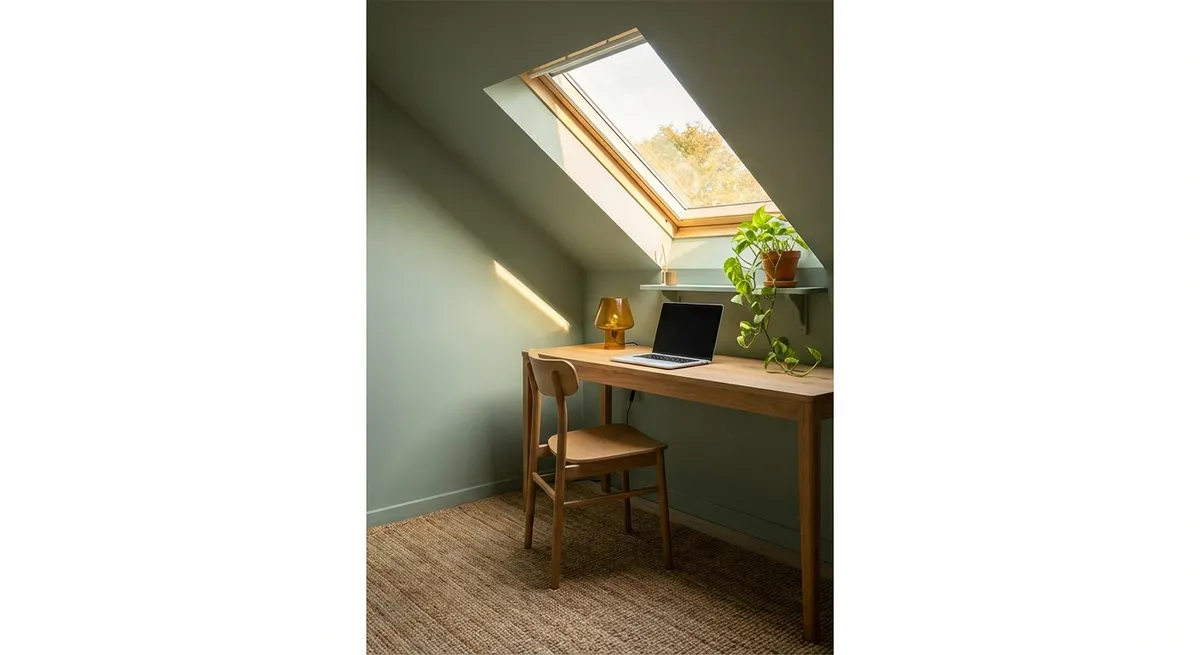
Turning an underused corner into a focused, comfortable home office doesn’t require a full remodel. With some planning, basic tools, and a weekend’s work, you can build a workspace that feels intentional instead of improvised.
This guide walks you through planning, building, and finishing a compact office nook that fits your home and your work style.
Plan Your Nook Like a Mini Renovation
Before you buy anything, treat this like a small renovation project, not just furniture shopping.
Start by choosing the right corner or wall. Look for a spot with at least one outlet nearby, minimal foot traffic, and as much natural light as you can get without glare directly on your screen. Avoid walls that back up to noisy spaces like laundry rooms if you take a lot of calls.
Measure the full width, depth, and height of the area. Note the location of outlets, switches, vents, and windows. Sketch the space on paper with measurements. Decide if you want a wall-to-wall desk, a floating “built-in” look, or a compact freestanding setup.
Think about how you work: do you need room for two monitors, a printer, or just a laptop? Do you need storage for files, tools, or kids’ school supplies? List your must-haves and nice-to-haves, then prioritize. This will help you avoid buying pieces that don’t actually fit or work with your layout.
Finally, set a realistic budget. Break it into categories: work surface, seating, lighting, storage, and finishing touches. This keeps you from over-investing in one feature and neglecting essentials like a good chair or adequate lighting.
Step 1: Prepare the Space and Fix Small Issues First
A small office nook feels better to use when the surrounding area is clean, solid, and visually calm.
Start by clearing everything out of the corner: furniture, wall art, random piles. Patch any obvious wall damage using lightweight spackle for nail holes and joint compound for larger dents or cracks. Once dry, sand flush with the wall for a smooth surface.
If the outlet looks old or loose, turn off power at the breaker and replace the cover plate at minimum. If you’re comfortable and local codes allow, this is a good time to replace yellowed outlets with tamper-resistant ones in a modern color. If anything feels unsafe or you’re unsure, bring in an electrician for this part and plan your desk layout around existing safe wiring.
Check the baseboard and flooring. Tighten any loose baseboard using finish nails or screws sunk below the surface and filled. If you have a squeaky area right in your planned chair zone, mark it; you may want to address it from below later, but for now avoid putting chair wheels on that exact spot.
Vacuum and wipe down the walls, trim, and floor. You’re about to be working close to these surfaces; starting clean makes painting, caulking, and setup faster and far less frustrating.
Step 2: Define the Workspace with Paint and Simple Trim
A small color and trim update can make a basic corner feel like a deliberate, built-in workspace.
Choose a paint color that contrasts slightly with the surrounding walls to visually “frame” the nook without making it cave-like. A light to mid-tone neutral works well in most homes. If your existing wall color is dark, consider going one step lighter for the nook to keep it bright on video calls.
Use painter’s tape to mark the boundaries of your office zone: full wall, a vertical band, or a rectangle that matches the width of your future desk. Remove outlet covers first, then cut in around them with a brush. Roll the main areas using a low-sheen finish (eggshell or matte) to reduce glare on camera.
If you want a more built-in look, add a simple horizontal trim board (like 1x3 pine or MDF) at desk height across the back wall. This can visually anchor the workspace and serve as a shallow ledger for a wall-mounted work surface later. Use a level, attach it to studs where possible with wood screws, and caulk the top edge for a seamless look before painting.
Let everything dry fully and do touch-ups now. It’s far easier than painting carefully around a desk, chair, and electronics later.
Step 3: Build a Sturdy, Space-Efficient Desk Surface
A solid work surface is the backbone of your office nook. You can build a custom-fit desk with basic tools and off-the-shelf materials.
Measure the exact width of your wall again. For a wall-to-wall desk, subtract about 1/8–1/4 inch from the width to avoid a too-tight fit. Choose your surface material: options include a prefinished laminate countertop section, a solid wood panel, or a high-grade plywood sheet you’ll sand and finish.
Cut the work surface to width (many home centers will cut boards and countertops for you). Aim for a depth between 20 and 30 inches; shallower for tight spaces, deeper if you use large monitors or spread out papers. Sand any cut edges smooth and break sharp corners slightly to avoid wrist discomfort.
To support the desk, locate studs in the back wall and side walls using a stud finder. Install 1x3 or 2x2 cleats along the back wall and, if applicable, the sides, at your desired desk height (usually 28–30 inches from floor for most adults). Use a level and secure the cleats into studs with appropriate screws.
Set the work surface on top of the cleats and check for level in both directions. Secure it from below through the cleats into the underside of the desk with short wood screws, making sure they don’t poke through. For extra support in wider spans, add one or two metal L-brackets or a simple leg at the front edge.
Finish the surface with a durable clear coat (polyurethane or water-based polycrylic) if it’s raw wood or plywood. Lightly sand between coats for a smooth feel. Allow to cure according to the product instructions before placing heavy equipment on top.
Step 4: Add Smart Storage Without Overloading the Wall
Good storage keeps your work surface clear and your nook from turning into a clutter magnet.
Start by deciding what belongs above the desk, within arm’s reach, and what can live slightly farther away. Frequently used items (notebooks, pens, small tools) should be near eye level; rarely used things can go higher.
For most corners, a combination of one shallow shelf and one closed storage element works well. Use wall anchors rated for the load if you can’t hit studs, but prioritize fastening into studs whenever possible, especially for heavier shelves or cabinets.
Install a narrow floating shelf or wall-mounted rail above the desk, about 12–18 inches above your monitor height. This keeps items visible but out of your direct sightline. Use this for small bins, reference books, or decor that doesn’t steal focus.
If you need closed storage, consider a simple wall cabinet or a pair of sturdy wall-mounted cubes on one side instead of spanning the full width. This visually lightens the space and prevents a boxed-in feeling. Keep cabinet depth to 12 inches or less to avoid bumping your head.
Under the desk, add a rolling drawer unit, a small file cabinet, or a set of stackable bins. Measure the space to ensure they fit comfortably with your legs and chair. Avoid permanently boxing in the area under the desk; you want flexibility to adjust your chair and posture.
Route cables before you load up shelves. Mount a cable tray or raceway under the desk and use adhesive clips or Velcro straps to guide cords up to shelves or equipment. You’ll thank yourself the first time you need to swap a device without crawling through a tangle of wires.
Step 5: Dial In Lighting, Acoustics, and Comfort
The final step turns a basic setup into a place you actually enjoy working.
For lighting, combine ambient and task light. If the room’s overhead light is harsh or poorly placed, add a dimmable desk lamp or wall-mounted sconce at about eye level, slightly to the side of your monitor to reduce glare. Use a warm-to-neutral color temperature bulb (around 3000–4000K) to keep eyestrain down and you looking natural on video.
If you’re near a window, position your desk so the light comes from the side rather than directly behind or in front of you. Add simple blinds or curtains to control brightness and prevent screen washout during parts of the day.
Address noise and echo with soft materials. A small area rug under your chair (use a low-pile or chair-mat-friendly one) can cut noise from rolling and foot movement. Hang a fabric-covered pinboard or corkboard on the wall; it doubles as organization and a basic sound absorber. If the nook is really echoey, consider a couple of simple acoustic panels or a fabric wall hanging.
Choose a chair that fits both your body and the space. Measure seat height against your desk height; your forearms should be roughly parallel to the work surface when typing. If you’re repurposing a non-office chair, add a lumbar cushion and a seat pad to improve support.
Finally, personalize just enough to make the space inviting without cluttering it. One or two plants, a framed print, or a small speaker are plenty. Keep surfaces mostly clear so your nook is ready to use as soon as you sit down, instead of requiring a reset every time.
Conclusion
A quiet, efficient home office nook doesn’t have to be a major renovation project. By planning the layout, refreshing the walls, building a sturdy custom-fit desk, adding smart storage, and fine-tuning lighting and comfort, you can transform an awkward corner into a workspace that actually supports how you work.
Treat it like a small renovation: measure carefully, secure everything properly, and finish the details. The payoff is a dedicated spot that makes it easier to focus, easier to keep organized, and easier to walk away from when the workday is done.
Sources
- U.S. General Services Administration – Office of Governmentwide Policy: Computer Workstation Ergonomics - Provides guidance on desk and chair heights, monitor placement, and posture for comfortable workstations
- Mayo Clinic – Office Ergonomics: Your How-To Guide - Explains ergonomic basics that help you set up a healthier home office nook
- U.S. Department of Energy – Energy Saver: Lighting Choices to Save You Money - Covers efficient lighting types and color temperatures useful for designing office lighting
- Consumer Product Safety Commission – Tip-Over Information Center - Offers safety advice for anchoring shelves and cabinets in home projects
- Occupational Safety and Health Administration (OSHA) – Computer Workstations eTool - Details workstation setup recommendations relevant to desk design and layout
Key Takeaway
The most important thing to remember from this article is that this information can change how you think about Renovation.