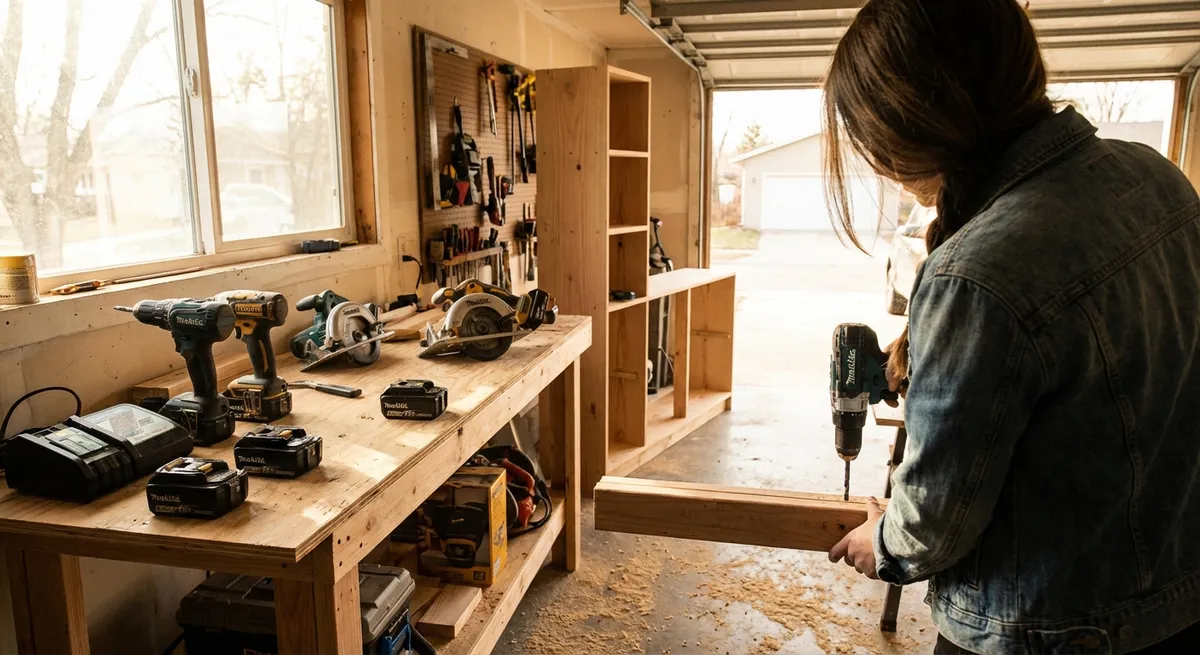
Cordless tools can turn frustrating home projects into quick wins—but only if you set up your kit the right way. Instead of buying random tools as you go, you can build a core cordless setup that’s safe, versatile, and ready when something breaks or a new project pops up. This guide walks through key decisions, practical setups, and five step-by-step mini-projects to help you get the most from your tools.
Start with a Battery Platform, Not Just a Drill
Most DIYers start by buying a single drill on sale, then end up with a pile of mismatched batteries and chargers. You’ll save time, money, and hassle by picking a battery platform first, then building your kit around it.
Look at major brands that offer a full line of 18V or 20V tools (drills, impact drivers, saws, nailers, lights, etc.). Check how many different tools run on the same battery and whether that platform has the gear you may want later—like a multi-tool, circular saw, or shop blower. Compare battery prices and availability: if replacement batteries are hard to find or very expensive, that platform will cost more in the long run. Stick with one or two platforms at most, so you can swap batteries between tools easily.
Build a Core Cordless Toolkit That Covers Real Jobs
Before you get into specialty gear, make sure your core tools can handle the most common tasks around the house. Think about the jobs you actually do: hanging shelves, replacing hardware, cutting plywood, fixing deck boards, or driving screws into studs.
A practical starter cordless kit usually includes a drill/driver, an impact driver, a work light, and at least one cutting tool such as a circular saw or oscillating multi-tool. The drill handles most holes and lighter screws; the impact driver shines when you’re driving long screws or working with tougher materials. A good work light sounds optional until you end up working in a dim closet or under a sink. Add tools based on your projects: a circular saw is great for framing and sheet goods, while a multi-tool is ideal for tight cuts, trim work, and detail fixes.
Power, Batteries, and Chargers: Set It Up Once, Use It for Years
Your tools are only as useful as your batteries. If they’re always dead—or you only own one—your projects will stall. Setting up a simple charging system at the beginning makes your cordless kit feel like pro gear.
Aim for at least two batteries to start: one on the tool, one on the charger. If you do longer weekend projects, consider a third battery or at least one higher-capacity pack (like 4Ah or 5Ah) for saws and high-draw tools. Mount your charger on a wall or shelf near an outlet to create a small “charging station.” Label batteries with a marker (e.g., #1, #2, #3) so you can rotate them and notice if one starts failing.
Avoid running lithium-ion batteries completely dead whenever possible; swap them when you feel a noticeable drop in power. Store them in a dry, moderate-temperature area—extreme heat and cold both shorten battery life. Unplug chargers if you’ll be away for a while; many modern chargers maintain safely, but it’s still good practice and protects from power surges.
Safety Basics That Make Your Cordless Tools Less Risky
Cordless tools feel “friendlier” than corded ones, but they can still cause serious injury if you’re careless. A few habits go a long way.
Always wear eye protection when cutting, drilling, or grinding—small chips travel fast. For loud tools like circular saws and impact drivers, add hearing protection. Keep fingers away from bits and blades, and disconnect the battery before changing accessories or clearing a jam. Use clamps or a sturdy work surface so you’re not trying to hold material with one hand while operating a tool with the other. Check manuals or brand websites for the recommended accessories and never force a tool to do something it’s not designed for; letting the tool do the work gives you cleaner results and reduces kickback.
Step-by-Step: Install a Wall-Mounted Power Strip at Your Work Area
A dedicated power strip near your workbench or tool corner keeps your charger, shop vac, and other essentials plugged in and ready. Here’s a simple project using common cordless tools.
Plan the location and check for hazards
Choose a spot above your work surface where cords won’t hang in the way. Use a stud finder to locate framing behind the wall if you’re in drywall. Avoid areas where electrical or plumbing is likely (directly over outlets, near sinks). Mark your mounting area lightly with a pencil.
Mark and level the mounting holes
Hold the power strip’s mounting bracket or back against the wall. Use a small level (or a laser level if you have one) to align it horizontally. Mark the screw hole locations through the mounting slots. If there’s no template, measure the spacing between the holes and transfer that to the wall carefully.
Drill pilot holes into studs or use anchors
If your marks line up with a stud, use a cordless drill with an appropriate bit (e.g., 1/8" for wood screws) to drill pilot holes. If you’re mounting into drywall without a stud, use drywall anchors rated for the load. Pre-drill small holes, insert anchors, and tap them flush with a hammer.
Drive mounting screws securely
Hold the strip or bracket in place and drive screws using your drill/driver. Don’t overtighten; drive them until snug and the strip doesn’t move when you press on it. If the strip hangs on keyhole slots, first drive screws slightly proud, then hang the strip and tighten as needed.
Test the setup and organize cords
Plug in the strip and flip its switch. Test with a small tool or charger to confirm power. Use hook-and-loop straps or small cable clips to route cords along the wall so they’re not dangling where you work or walk. This small upgrade makes your charging and tool area feel more permanent and safer.
Step-by-Step: Swap Worn Driver Bits and Store Them Smarter
A simple bit change can make fastening faster and reduce stripped screws. Many DIYers use the same worn bit for months; this quick routine fixes that.
Identify worn or damaged bits
Lay out your most-used bits (Phillips, square, Torx, hex). Look for rounded edges, chips, or tips that rock in a screw head instead of fitting snugly. If a bit slips easily under light torque, it’s worn out.
Remove the old bit safely
Take the battery out of your drill or impact driver. Pull the bit from the chuck or quick-release collar. If your chuck is tight, hold it firmly and rotate the tool body to loosen before removing the bit.
Install fresh, high-quality bits
Insert a new bit that matches your most-used screw types. Push it fully into the chuck or quick-change holder. For a drill’s keyless chuck, hold the front ring and tighten until you feel firm resistance and no wobble.
Create a “go-to” bit holder
Use a small magnetic rail, belt clip carrier, or a compact bit case that can live in your tool bag or on the drill. Load it with 6–10 bits you use most often so you’re not hunting separate boxes mid-project.
Label and rotate
If you have multiples of the same bit, put a tiny dot of paint or marker on new ones (e.g., “24” for the year). Retire or toss any that slip or are visibly damaged. This habit reduces stripped screw heads and speeds up every project that involves fasteners.
Step-by-Step: Cut a Straight Line in Plywood with a Circular Saw
If you’re adding shelves or working on simple furniture, straight cuts are essential. You can get clean, accurate cuts with a basic circular saw and a simple guide.
Measure and mark your cut line
Place the plywood on a pair of sawhorses or a sacrificial sheet of foam board on the ground. Measure your required width at both ends and mark with a pencil. Use a straightedge or a 4-foot level to connect the marks into a clear cut line.
Make a quick cutting guide
Clamp a straight board (factory edge of another plywood piece or a straight 1x4) parallel to your cut line. Measure from the saw blade to the edge of the saw’s base plate and offset the guide by that amount. Clamp securely at both ends so it can’t move.
Set blade depth and check for clearance
Unplug or remove the battery from your saw. Adjust the blade depth so the teeth extend about 1/4" below the wood—you don’t need more. Confirm that your support setup leaves room for the blade without cutting into sawhorses or the ground.
Make the cut with steady speed
Reinsert the battery, set the saw’s base against the guide, and start the saw before entering the wood. Let the blade reach full speed, then move steadily along the guide, keeping firm pressure against it. Don’t force the saw; consistent speed gives a cleaner edge.
Support the offcut and finish safely
Make sure the offcut piece is supported so it doesn’t snap or pinch the blade near the end of the cut. Once finished, release the trigger and wait for the blade guard to fully cover the blade before setting the saw down. Check the cut edge—if it’s splintering, try a finer-tooth blade next time.
Step-by-Step: Use an Oscillating Multi-Tool for a Clean Trim Cut
An oscillating multi-tool is one of the most useful cordless tools for precise, awkward cuts—like trimming door casing for new flooring or cutting out a small damaged section of drywall.
Choose the right blade for the job
For wood trim, use a fine-tooth wood-cutting blade. For nails or metal, choose a bi-metal blade. Match the blade shape to your cut; straight blades are good for plunge cuts, while semicircular blades work well for longer, straight runs.
Mount and align the blade
Remove the battery. Attach the blade according to your tool’s system (tool-free lever or hex screw). Align the blade so its cutting edge is oriented the way you’ll be working—often in line with the tool for accessing tight spaces.
Mark the cut and protect nearby surfaces
Use a sharp pencil or painter’s tape to mark your cut line. If you’re cutting flush against flooring or another finished surface, lay down painter’s tape or a thin scrap as a glide surface to prevent scratching.
Start slow and let the tool do the work
Insert the battery, set a medium speed, and position the blade where you want to start. Turn the tool on and let the blade touch the material gently. Apply light pressure; the oscillating action will chew through the material without needing to force it.
Finish and clean up the cut
Follow your line, adjusting speed and pressure as needed. Once done, turn the tool off and wait for complete stop before lifting it away. Lightly sand or scrape away any fuzz or small splinters. For repeated tasks—like undercutting door jambs for flooring—use the same scrap piece as a consistent height guide to keep all cuts even.
Step-by-Step: Create a Simple Charging and Storage Station
Instead of scattered tools and dead batteries, set up a small cordless “home base” so everything has a spot and stays ready.
Pick a dedicated wall or corner
Choose a dry, accessible area in your garage, basement, or utility room. You want one outlet, enough wall space for a charger and a small shelf, and room for you to stand and swap tools easily.
Mount a small shelf or cabinet
Use your drill and a level to mount a basic wall shelf or shallow cabinet into studs. This will hold your chargers, batteries, and smaller tools. Follow the manufacturer’s instructions for screw size and spacing.
Install and label chargers
Place your chargers on the shelf or mount them on the wall if they’re designed for it. Label each charger with the tool brand and voltage (e.g., “Brand X 18V”). This helps if you add a second platform later and prevents mixing incompatible batteries.
Add simple tool holders or hooks
Use screw-in hooks, a pegboard, or purpose-built tool hangers to store your drill, impact driver, and multi-tool with batteries removed. Hang them handle-down so you can grab and go. Dedicate one hook or spot as the “empty” battery location so you always know which pack needs charging.
Create a quick-check routine
Once a week—or before a big project—check battery charge levels. Put low ones on the charger and move freshly charged packs to your “ready” spots. Keep a small notepad or marker board nearby to note any batteries acting weak, tools needing new blades, or bits to replace. This keeps your cordless system running smoothly instead of constantly reacting to dead packs.
Conclusion
A smart cordless tool setup isn’t about owning every tool in the catalog—it’s about choosing a solid battery platform, building a versatile core kit, and organizing things so they’re actually ready when you need them. With a basic charging station, a few safety habits, and repeatable steps for common tasks, your tools become a reliable part of your home instead of clutter in a corner. Start with what you have, upgrade intentionally, and let each new project guide what you add next.
Sources
- U.S. Department of Energy – Energy Saver: Portable Electric Tools - General guidance on safe and efficient use of portable power tools
- Occupational Safety and Health Administration (OSHA) – Hand and Power Tools - Official safety practices and hazard information for power tool use
- Family Handyman – Tool Storage Ideas - Practical examples of organizing tools and creating storage/charging areas
- Consumer Reports – Cordless Drill Buying Guide - In-depth look at cordless drill features, batteries, and what to look for when choosing a platform
- Fine Homebuilding – Using an Oscillating Multi-Tool - Detailed explanations and examples of effective multi-tool use for home projects
Key Takeaway
The most important thing to remember from this article is that this information can change how you think about Tools & Equipment.