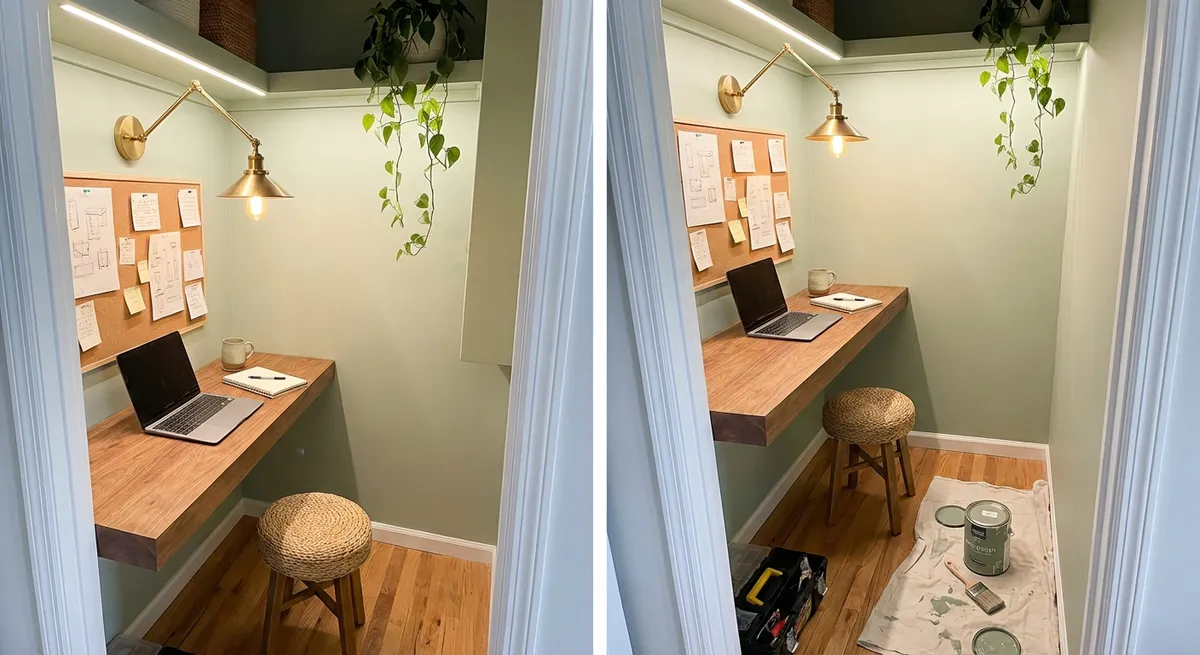
Too many homes have a dark, cluttered closet that does nothing but store junk. With a bit of planning and a few tools, you can turn that wasted space into a compact, functional home workspace—perfect for bills, homework, or remote work. This project is beginner-friendly, budget-conscious, and can usually be done over a weekend.
Below is a straightforward, step‑by‑step guide to take you from messy closet to practical mini-office.
Step 1: Plan the Space and Clear Everything Out
Before you pick up a tool, decide how you want this space to work.
Measure the inside width, depth, and height of your closet. Write these numbers down—you’ll use them repeatedly. Consider:
- How will you use the space? Laptop work, crafting, studying, or bill-paying?
- Do you need to close the doors when it’s not in use?
- What power and lighting are already available?
Empty the closet completely, including the hanging rod and any old shelves you don’t want. As you clear, sort items into keep, donate, and trash piles so you’re not just relocating clutter.
Inspect the walls for damage, loose drywall, or signs of moisture. Patch nail holes with spackle, sand once dry, and wipe down walls and baseboards with a mild cleaner. This gives you a clean slate and helps new paint or fixtures adhere properly.
If your closet has carpet and you want a cleaner, office-like surface, consider removing the carpet in that area and installing a small section of laminate, vinyl plank, or a washable rug you can easily roll back.
Step 2: Add Power and Lighting Safely
A workspace without good power and lighting will be frustrating to use.
First, check for nearby outlets. If there’s one just outside the closet, you may be able to:
- Use a flat extension cord rated for the load and secure it with cord clips along the trim, or
- Have a licensed electrician add a new outlet inside the closet (best option, and important if you’ll be using a computer or other electronics regularly).
Avoid overloading a single circuit with heaters, printers, and multiple monitors. If you’re unsure your electrical system can handle new demands, consult a pro—electrical work is not the place to guess.
For lighting, you have a few good DIY options:
- Plug-in puck or strip lights: Easy to install under shelves or along the top with adhesive strips.
- Battery-operated LED lights: Good if there’s no easy access to power, but you’ll need to replace/recharge batteries.
- Plug-in pendant or clamp lights: Great for directed task lighting; just secure cords neatly.
Plan to place your main light above and slightly in front of your work surface to avoid casting shadows on your keyboard or notebook. Choose bulbs with a color temperature around 3000K–4000K (labeled “soft white” to “cool white”) for comfortable task lighting.
Step 3: Build a Simple, Sturdy Desktop
A solid work surface is the heart of your mini workspace. You don’t need custom cabinetry—simple materials can look clean and modern.
Choose one of these common approaches:
- Wall-to-wall desk using a board or panel:
- Repurposed top:
Use a pre-cut laminate shelf, a sanded plywood panel, or a solid wood board cut to your closet’s inside width. Depth of 18"–24" works well for most people.
Old table tops or countertop offcuts can be trimmed to fit with a circular saw or jigsaw.
To support the desk, use one of these setups:
- Support cleats + front legs
- Cut 1x2 or 1x3 boards to run along the back and side walls at your desired desk height.
- Use a level to mark a line on each wall, then pre-drill and screw the cleats into wall studs.
- Add two front legs (pre-made metal legs or 2x2 wood legs) near the front corners for stability.
- Heavy-duty wall brackets
- Screw robust L-brackets into studs along the back wall and, if possible, the sides.
- Attach the desktop to the brackets from below with short screws.
General tips:
- Standard desk height is about 29"–30" from floor to top. Adjust slightly if you’re short or tall or if you use a specific chair.
- Use a stud finder to locate studs. If you must fasten into drywall only, use rated toggle anchors and check the weight limits.
- Sand rough edges lightly and seal raw wood with paint or clear polyurethane to prevent splinters and stains.
Test your new desktop by leaning on it and placing some weight (like a stack of books) before committing to heavy daily use.
Step 4: Add Smart Storage and Cable Management
To keep your workspace usable long-term, you need storage that fits the space and a plan for taming cables.
For storage, focus on the vertical space:
- Install a shelf 12"–18" above the desktop for books, bins, or a printer.
- Use adjustable shelving tracks if you want the flexibility to reconfigure later.
- Mix open shelves with a few closed boxes or baskets to hide visual clutter.
- Use shallow organizers (or even repurposed kitchen drawer organizers) on the desk surface for pens, chargers, and sticky notes.
For cables, a little planning makes a big difference:
- Mount a power strip with surge protection to the wall or underside of the desk to centralize plugs.
- Use cable clips or adhesive raceways to route cords along the back wall or underside of the desk.
- Label each plug with masking tape or small tags so you can quickly identify what to unplug.
- Keep chargers in a small box or docking station so they don’t spread across the entire surface.
If you plan to use a desktop computer, consider:
- A small under-desk CPU holder or side stand to keep the tower off the floor.
- A monitor arm clamped to the desktop to free up surface space and improve ergonomics.
Step 5: Finish, Decorate, and Optimize for Daily Use
Once the structure is in place, finishing touches make the space inviting and practical.
Paint or refresh the interior:
- A light, neutral color can make the small space feel larger and brighter.
- Consider painting the back wall a slightly deeper accent color to create a “focus wall.”
- If you don’t want to paint, removable peel-and-stick wallpaper or wall decals can add character without long-term commitment.
Think about comfort and ergonomics:
- Choose a chair that fits under the desk and can roll in and out if the closet is shallow. If space is extremely tight, a backless stool that tucks fully under the desk can work.
- Aim for your monitor to be roughly at eye level when you’re seated and your elbows at about 90 degrees when typing.
- Add a small footrest (even a low, sturdy box) if your feet don’t rest flat on the floor comfortably.
Add simple décor that won’t get in the way:
- A small corkboard, whiteboard, or magnetic board on the side wall for notes and reminders.
- One or two small framed prints or a calendar to make the space feel intentional, not improvised.
- A compact plant (real or artificial) on an upper shelf for a bit of life without taking up crucial desk space.
Finally, test the setup for a few days and adjust:
- Are there items you never use that can be removed?
- Do you consistently reach for something that should live closer to your main working zone?
- Is the lighting bright enough for evening work?
Make small changes—shifting shelves, swapping organizers, adding a clip-on light—until the space supports the way you actually work, not just how you imagined you would.
Conclusion
Turning an unused closet into a dedicated workspace is a practical renovation that doesn’t require advanced skills or a huge budget. By planning the layout, adding safe power and lighting, building a simple desk, organizing storage, and finishing with comfortable details, you can create a focused spot for work or study that fits right into your existing home.
Start with accurate measurements and a clear purpose, follow each step methodically, and you’ll end up with a compact, efficient workspace that helps you get more done—without needing to add a single square foot to your house.
Sources
- U.S. Department of Energy – LED Lighting - Explains LED lighting options, efficiency, and choosing the right bulbs for task lighting
- Occupational Safety and Health Administration (OSHA) – Computer Workstations eTool - Provides guidance on ergonomic desk and monitor setup to reduce strain
- Family Handyman – How to Install a Floating Desk - Step-by-step example of building and supporting a wall-mounted desk surface
- The Spruce – How to Install a Shelf - Covers finding studs, using brackets, and mounting shelves safely
- National Fire Protection Association – Electrical Safety in the Home - Guidance on safe use of electrical outlets, cords, and power strips in home projects
Key Takeaway
The most important thing to remember from this article is that this information can change how you think about Renovation.